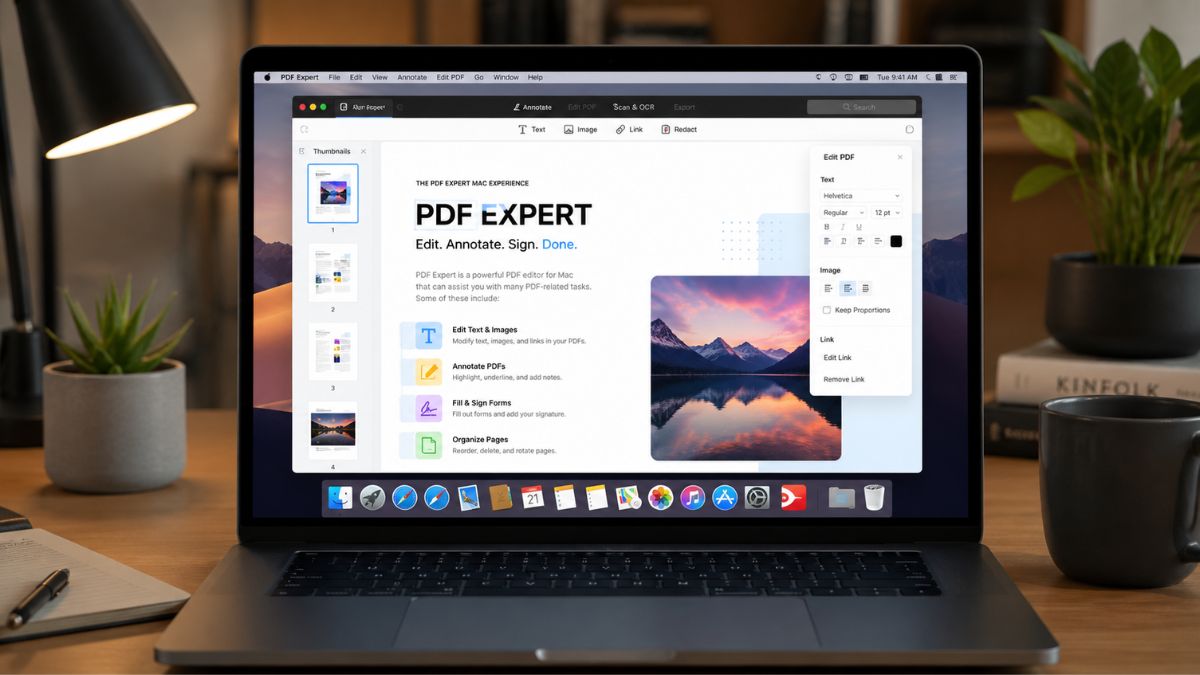
Managing PDF files can quickly become a frustrating part of your daily workflow.
Whether you’re reviewing contracts, editing reports, annotating research papers, or organizing business documents, you need software that works efficiently without adding unnecessary complexity. For Mac users, PDF Expert has become one of the most recognized PDF management solutions, offering a balance between powerful features and an intuitive user experience.
If you regularly work with PDF files, understanding what PDF Expert offers can help you determine whether it deserves a place in your productivity toolkit.
Reasons PDF Expert Remains Popular Among Mac Users
PDF Expert was designed specifically for the Apple ecosystem, which gives it a distinct advantage for Mac users. Rather than feeling like a cross-platform application adapted for macOS, it integrates naturally with the Mac experience.
The software focuses on helping you perform common PDF tasks quickly, including:
- Editing text and images
- Annotating documents
- Filling out forms
- Signing PDFs
- Organizing pages
- Converting files
- Using OCR for scanned documents
This combination makes it attractive to students, professionals, freelancers, and business owners who handle documents on a regular basis.
Editing PDFs Without Complicated Workflows
One of the biggest reasons users choose PDF Expert is its editing functionality.
Text and Image Editing
Many PDF readers allow you to view files but offer limited editing capabilities. PDF Expert enables you to modify existing text, adjust formatting, and replace or reposition images directly within a document.
For professionals working with contracts, proposals, presentations, and reports, this can eliminate the need to recreate entire files from scratch.
Page Management Features
Document organization is another area where PDF Expert performs well.
You can:
- Rearrange pages
- Rotate pages
- Merge multiple PDFs
- Extract selected pages
- Delete unnecessary sections
These tools help simplify large document projects and reduce the time spent juggling multiple files.
Annotation and Collaboration Tools
PDF collaboration has become increasingly important in remote and hybrid work environments.
Before exploring specific annotation tools, it’s worth noting that PDF Expert prioritizes a clean and distraction-free review experience, making it easier to focus on document feedback and revisions.
Markup Features
You can add:
- Highlights
- Underlines
- Strikethroughs
- Sticky notes
- Text comments
- Shapes and drawing tools
These features make reviewing contracts, academic papers, project plans, and client documents significantly easier.
Faster Document Reviews
For teams and individuals who exchange feedback frequently, annotation tools help centralize communication directly inside the document rather than through lengthy email chains.
This streamlined workflow can improve productivity and reduce misunderstandings.
OCR and Document Conversion Capabilities
Many users deal with scanned documents that are difficult to search or edit.
Optical Character Recognition (OCR)
PDF Expert includes OCR functionality that converts scanned pages into searchable and selectable text.
This feature can be especially valuable if you work with:
- Archived records
- Printed contracts
- Legal documents
- Research materials
- Business paperwork
Searchable files make information retrieval significantly faster.
File Conversion
The software also supports converting PDFs into other formats, helping you repurpose content when needed.
Depending on your workflow, this flexibility can reduce dependence on multiple document-management applications.
Performance and User Experience
One of PDF Expert’s strongest advantages is speed.
Optimized for macOS
The software generally opens large documents quickly and navigates smoothly between pages. Mac users often appreciate the responsive interface and clean design philosophy.
The layout feels approachable even for users who are not particularly tech-savvy.
Learning Curve
Compared to some enterprise-focused PDF platforms, PDF Expert is relatively easy to learn.
You can typically begin editing, annotating, and organizing documents without spending significant time studying tutorials or documentation.
PDF Expert’s Limitations and Considerations
No software solution is perfect, and PDF Expert has a few considerations worth evaluating before purchasing.
Premium Features Require a Subscription
While PDF Expert offers substantial functionality, some advanced capabilities are locked behind premium plans.
If you only occasionally work with PDFs, the ongoing cost may be difficult to justify compared to free alternatives.
Mac-Centric Focus
The software is particularly optimized for Apple users.
If your workflow regularly switches between Windows, Mac, and Android devices, you may prefer a platform with broader cross-platform consistency.
Advanced Enterprise Needs
For large organizations with highly specialized compliance, automation, or enterprise document requirements, some dedicated enterprise PDF solutions may provide more advanced features.
However, many individual professionals and small businesses may never encounter these limitations.
Who Should Consider PDF Expert
PDF Expert may be especially valuable if you are:
- A student reviewing academic materials
- A freelancer handling contracts and proposals
- A remote worker collaborating on documents
- A business professional managing reports and forms
- A Mac user seeking a streamlined PDF workflow
On the other hand, users with minimal PDF editing needs may find that a basic PDF reader satisfies their requirements.
What It All Means
PDF Expert for Mac delivers a well-rounded combination of PDF editing, annotation, OCR, organization, and conversion tools within a user-friendly interface. Its Mac-focused design, strong performance, and straightforward workflow make it a compelling option for individuals who work with PDF documents regularly.
While subscription costs and platform limitations may not suit every user, many professionals find that the productivity gains justify the investment. If document management is a frequent part of your day, PDF Expert is worth considering.
For more productivity-focused recommendations and thoughtful gift ideas, be sure to explore additional guides and resources from PDX Expert.
Leave a Reply