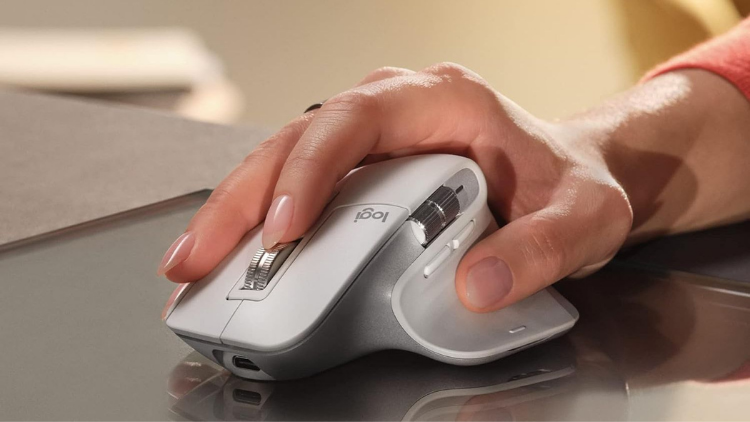
The mouse that rests beneath the palm for over eight hours each day deserves thoughtful evaluation. Logitech’s flagship MX Master series has long led the premium productivity mouse market, and the latest iteration continues to set new standards. After extensive testing, the new Logitech MX Master 4 demonstrates its capabilities through an 8,000 DPI Darkfield sensor, haptic feedback system, and redesigned semi-transparent buttons.
Notable features include a 70-day battery life and the ability to track seamlessly on glass surfaces, but the standout improvement lies in its refined ergonomics, which enhance comfort during extended editing sessions. This review explores whether the MX Master 4 delivers enough innovation and performance to justify its premium price point.
Design and Build Quality
The Logitech MX Master 4 presents a significant design refresh with its new semi-transparent buttons featuring a textured finish. This departure from the soft-touch materials of previous iterations provides a distinctive aesthetic appeal, though some users may find it less grippy than the older designs. The transparency offers a glimpse into the internal mechanisms, adding a technical dimension to the visual experience.
Dimensionally, the mouse measures approximately 88.35 × 128.15 × 50.8 mm, maintaining the substantial footprint that MX Master users have come to expect. Weighing in at approximately 150-151g, this mouse is decidedly on the heavier side compared to many contemporary options. The substantial weight contributes to a premium feel but may prove fatiguing for users accustomed to lighter peripherals.
The right-handed ergonomic design remains a cornerstone of the MX Master series, with contours meticulously crafted to support the natural resting position of the hand. The pronounced thumb rest provides excellent support during extended work sessions, though this design choice completely excludes left-handed users—a limitation that persists throughout the MX Master lineup.
Build quality remains exceptional with premium materials throughout. Each button provides consistent actuation force with satisfying tactile feedback, demonstrating Logitech’s attention to manufacturing precision. The mouse exhibits no structural flex or creaking when gripped firmly—an important consideration for a premium peripheral that will see daily use for years.
Advanced Features and Controls
The MagSpeed electromagnetic scroll wheel remains one of the MX Master 4’s standout features, offering dual-mode operation that adapts to your scrolling behavior. When scrolled slowly, the wheel operates in a precise ratchet mode with distinct notched feedback. Speed up your scrolling, and the wheel automatically switches to a free-spinning mode that can traverse thousands of lines in seconds. This intelligent adaptation eliminates the need to manually toggle between modes, though a dedicated button allows for manual switching when preferred.
Complementing the main scroll wheel, the thumb wheel provides horizontal scrolling capabilities—an invaluable tool for navigating wide spreadsheets, timeline-based applications, or large canvases in creative software. The thumb wheel’s implementation is intuitive, allowing for natural side-to-side navigation without awkward keyboard modifier combinations.
The Action Ring represents a significant evolution in the MX Master control scheme. This multifunctional input provides gesture support with contextual haptic feedback, offering tactile confirmation when gestures are recognized. The haptic system provides subtle, precise feedback that enhances interaction without becoming distracting—a thoughtful implementation that adds genuine value to the user experience.
Side buttons maintain their strategic placement, easily accessible without accidental activation. These buttons come with logical default functions but reveal their true potential when customized through Logitech’s software to trigger application-specific commands or complex macros.
Technical Specifications and Performance
The Logitech Darkfield sensor delivers tracking precision up to 8,000 DPI, maintaining exceptional accuracy across virtually any surface—including glass. This surface versatility represents a significant advantage for professionals who work in varied environments without consistent desk surfaces. Testing confirms Logitech’s claims of reliable tracking on glass at least 4mm thick, outperforming most competing sensors in challenging surface scenarios.
Operating at a 125 Hz polling rate, the MX Master 4 prioritizes battery efficiency over ultra-high responsiveness. This polling frequency proves more than adequate for productivity tasks but creates a perceptible latency that gaming enthusiasts would find unacceptable. For context, gaming mice typically offer 500-1000 Hz polling rates to minimize input lag.
Connectivity options include both Bluetooth and the proprietary Logi Bolt USB-C dongle. The Logi Bolt connection delivers superior reliability and reduced latency compared to Bluetooth, though at the cost of occupying a USB port. Multi-device pairing allows seamless switching between up to three connected devices with a simple button press, significantly reducing friction when working across multiple computers.
Battery performance impresses with up to 70 days of typical use per charge. Quick-charge capability provides approximately three full workdays of use from a one-minute charge—an invaluable feature when caught with a depleted battery. The mouse charges via USB-C but functions exclusively as a wireless device with no wired input mode available during charging.
Software and Customization
Logi Options+ serves as the control center for the MX Master 4, offering comprehensive customization capabilities through an intuitive interface. Initial setup requires minimal effort, with the software automatically detecting the mouse and providing recommended configurations based on installed applications.
App-specific profiles represent the software’s most powerful productivity feature. These contextual configurations automatically adapt button functions and gesture controls to match the active application. For instance, the thumb wheel might control brush size in Photoshop, timeline zoom in Premiere Pro, and horizontal scrolling in Excel—all switching automatically as you change applications.
The Action Ring customization options reveal remarkable depth, allowing configuration for application control, system functions, or custom keystrokes. Gesture programming extends functionality further, with the ability to assign different actions to movements while pressing the Action Ring. Each gesture provides haptic confirmation when successfully executed, adding a tactile dimension to these invisible commands.
Flow functionality enables seamless control across multiple computers, allowing the cursor to transition between screens as if using a multi-monitor setup—even when controlling entirely different computers. This feature includes clipboard sharing capabilities, facilitating efficient transfer of text and files between separate machines.
Regular software updates expand functionality over time, with Logitech’s track record suggesting continued enhancement of capabilities throughout the product lifecycle.
Real-World Applications
In professional office environments, the MX Master 4 demonstrates exceptional versatility. Document navigation benefits from the adaptive scroll wheel, while spreadsheet manipulation becomes significantly more efficient through the horizontal thumb wheel. The customizable buttons and gestures reduce dependence on keyboard shortcuts, maintaining workflow momentum during complex tasks.
Creative professionals working with Adobe Creative Cloud applications will find particular value in the MX Master 4. Testing with Photoshop reveals how the precision sensor and customizable controls accelerate common editing tasks. The thumb wheel can be configured to adjust brush sizes or zoom levels, while gestures can trigger tool switching or canvas rotation. This contextual adaptation significantly reduces the time spent on repetitive interface interactions.
Video editors benefit from the horizontal scroll wheel for timeline navigation, while the programmable buttons can trigger frequently used functions like splitting clips, adding markers, or toggling between editing modes. The precision sensor ensures accurate positioning when making fine adjustments to clip boundaries or keyframes.
Gaming represents the one area where the MX Master 4 falls short. The 125 Hz polling rate introduces noticeable latency compared to dedicated gaming mice, while the substantial weight limits rapid repositioning during intense gameplay. FPS gamers in particular will find the mouse unsuitable for competitive play, though casual gaming remains perfectly acceptable.
Comparing practical use cases with other premium mice reveals that the MX Master 4 excels in environments requiring diverse input methods and application-specific adaptability. While lighter mice may offer better comfort for extended use and gaming-oriented options provide superior responsiveness, few alternatives match the MX Master 4’s combination of versatility and application-specific optimization.
The Verdict: Is the MX Master 4 Worth It?
After extensive testing across multiple devices and workflows, the Logitech MX Master 4 proves itself a worthy evolution of the iconic productivity mouse line. The combination of the precise Darkfield sensor, innovative haptic feedback, and extensive customization options creates a compelling package for professionals who spend hours at their computer. While the 150g weight might deter those seeking ultra-lightweight options, and the right-handed design excludes left-handed users, the ergonomic benefits and productivity enhancements make this a standout peripheral for 2025.
For existing MX Master 3/3S owners, the upgrade path isn’t essential unless you specifically need the haptic feedback or prefer the new textured finish. However, for anyone using basic mice or older models, the MX Master 4 represents a significant upgrade that will likely pay productivity dividends. At its premium price point, this isn’t a mouse for everyone—but for professionals who view their peripherals as important tools rather than simple accessories, the MX Master 4 is an investment that your wrists and workflow will thank you for.
Leave a Reply